
| 일 | 월 | 화 | 수 | 목 | 금 | 토 |
|---|---|---|---|---|---|---|
| 1 | 2 | 3 | 4 | 5 | 6 | 7 |
| 8 | 9 | 10 | 11 | 12 | 13 | 14 |
| 15 | 16 | 17 | 18 | 19 | 20 | 21 |
| 22 | 23 | 24 | 25 | 26 | 27 | 28 |
| 29 | 30 | 31 |

- 파워서플라이
- 이클립스
- 자바
- 설정
- 공부
- MSI
- 오류
- 별 찍기
- while
- spring
- 순환문
- jsp
- 환경설정
- 백준문제
- 스프링
- ORA-01407
- 티스토리 블로그
- Oracle
- 오라클
- for문
- 백준문제풀이
- Ajax
- 깃허브 블로그
- 백준
- 전화번호부
- 오류모음
- 이클립스단축기
- 무결성 제약조건
- 인터페이스
- ORA-02292
- Today
- Total
danDevlog
Spring - 20(스프링 시큐리티-3) 본문
이제 게시물의 글쓰기, 삭제, 수정을 할때 해당 로그인 작성자만이 해당 기능들을 수행할 수 있게 코드를 추가한다.
servlet-context.xml
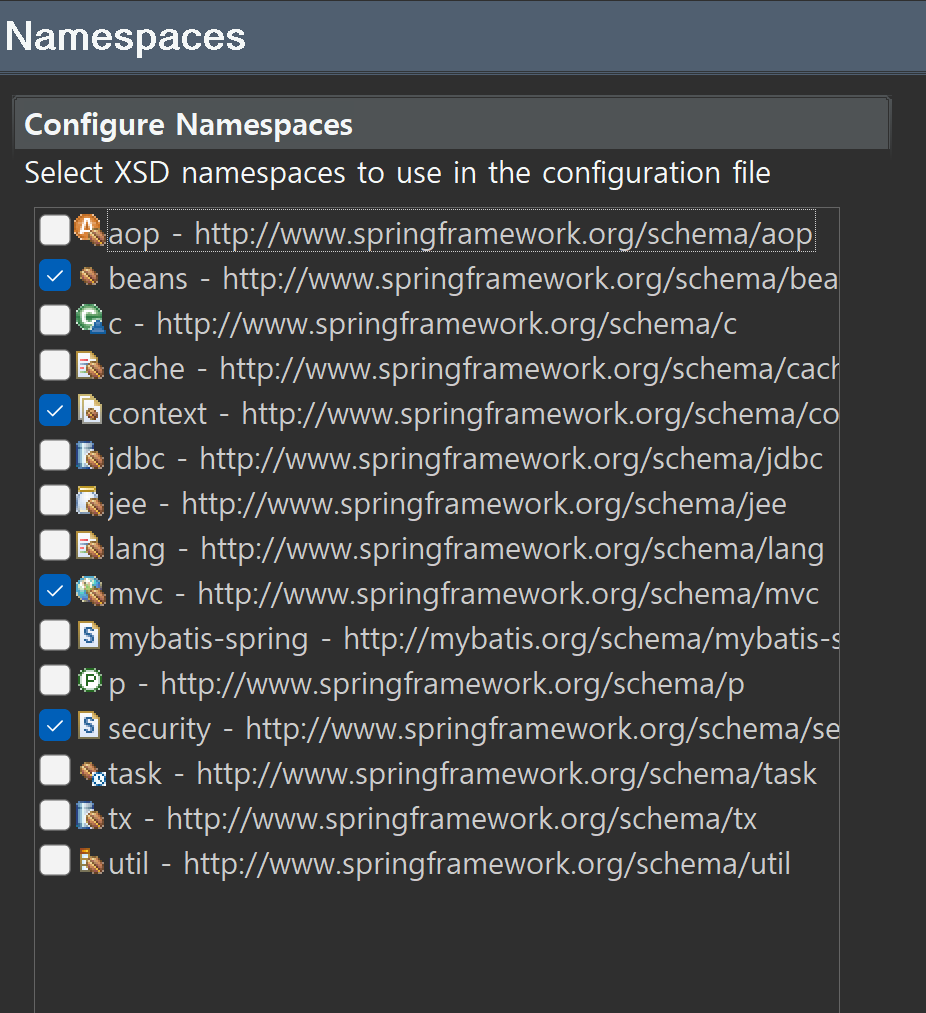
<security:global-method-security pre-post-annotations="enabled" secured-annotations="enabled"/>위의 코드를 추가한다. 해당 코드를 추가해야 시큐리티와 관련된 어노테이션을 사용할 수 있다.
추가로 위에 spring-security. ~~ .xsd 라고 버전이 적혀있을텐데 버전을 지워줘야 오류가 발생하지않는다.
BoardController에 접근처리를 추가한다.
	@PostMapping("/register")
	@PreAuthorize("isAuthenticated()")
	public String register(BoardVO board, RedirectAttributes rttr) {
		log.info("등록" + board);
		service.register(board);

		if(board.getAttachList() != null) {
			board.getAttachList().forEach(attach -> log.info(attach));
		}

		rttr.addFlashAttribute("result", board.getBno());
		return "redirect:/board/list";
	}
@PostMapping("/modify")
@PreAuthorize("principal.username==#board.writer")
public String modify(BoardVO board, RedirectAttributes rttr,
@ModelAttribute("cri") Criteria cri) {
log.info("modify:" + board);
if(service.modify(board)) {
rttr.addFlashAttribute("result", "성공");
}
return "redirect:/board/list" + cri.getListLink();
} @PostMapping("/remove")
@PreAuthorize("principal.username==#board.writer")
public String remove(@RequestParam("bno") Long bno, RedirectAttributes rttr,
@ModelAttribute("cri") Criteria cri, String writer) {
log.info("삭제" + bno);
if (service.remove(bno)) {
rttr.addFlashAttribute("result", "성공");
}
return "redirect:/board/list" + cri.getListLink();
}register, modify, remove에 코드를 추가하였다.
register.jsp
작성자 div태그의 input태그부분 (해당 로그인한 계정의 username으로 readonly)
			<div class="form-group">
				<label>작성자</label>
				<input class="form-control" name="writer"
				value='<sec:authentication property="principal.username"/>'
				readonly="readonly">
			</div>
var csrfHeaderName = "${_csrf.headerNAme}";
var csrfTokenValue = "${_csrf.token}"; $("input[type='file']").change(function(e) {
var formData = new FormData();
var inputFile = $("input[name='uploadFile']");
var files = inputFile[0].files;
for (var i = 0; i < files.length; i++) {
if (!checkExtension(files[i].name, files[i].size)) {
return false;
}
formData.append("uploadFile", files[i]);
}
$.ajax({
url: '/uploadAjaxAction',
processData: false,
contentType: false,
beforeSend : function(xhr) {
xhr.setRequestHeader(
csrfHeaderName,csrfTokenValue);
},
data: formData,
type: 'POST',
dataType: 'json',
success: function(result) {
console.log(result);
showUploadResult(result);
}
});
}); $(".uploadResult").on("click","b", function(e) {
console.log("파일 삭제");
var targetFile = $(this).data("file");
var type = $(this).data("type");
var targetLi = $(this).closest("li");
$.ajax({
url : '/deleteFile',
data : {
fileName : targetFile,
type : type
},
beforeSend : function(xhr) {
xhr.setRequestHeader(
csrfHeaderName,csrfTokenValue);
},
dataType : 'text',
type : 'POST',
success : function(result) {
alert(result);
targetLi.remove();
}
});
});ajax 처리시 csrf 값을 전송하기 위해 csrf변수를 선언한다.
스프링 시큐리티는 데이터 post전송시 csrf 값을 꼭 확인하므로 필요한 작업이다.
ajax처리부분에 beforeSend 로 csrf값을 전송한다.
다음은 get.jsp
		<sec:authentication property="principal" var="pinfo"/>
		<sec:authorize access="isAuthenticated()">
			<c:if test="${pinfo.username eq board.wrtier }">
				<button data-oper="modify" class="btn btn-warning" id="modify_btn">수정</button>
			</c:if>
		</sec:authorize>
principal 정보를 pinfo라는 이름으로 jsp에서 이용한다고 sec:authentication태그로 선언했으며,
인증된 사용자만 허가하며, 인증되었으면서 작성자가 본인 일때 수정 버튼을 표시하게 변경하였다.
<div class="row">
	<div class="col-lg-12">
		<div class="panel panel-default">
			<div class="panel-heading">
				<i class="fa fa-comments fa-fw"></i>덧글
				<sec:authorize access="isAuthenticated()">
					<button id="addReplyBtn" class="btn btn-primary btn-xs float-right">새 덧글</button>
				</sec:authorize>
			</div>
			<br>
			<div class="panel-body">
				<ul class="chat">
					<li>good</li>
				</ul>
			</div>
			<div class="panel-footer"></div>
		</div>
	</div>
</div>
새 덧글을 작성하는 버튼또한 위에 수정버튼처럼 인증된 사용자만 작동하도록 변경
		var replyer=null;
		<sec:authorize access="isAuthenticated()">
			replyer='${pinfo.username}';
		</sec:authorize>
허가되었다면, 작성자의 이름을 pinfo에서 가져와서 replyer에 저장
		$("#addReplyBtn").on("click", function(e) {
			modal.find("input").val("");
			modal.find("input[name='replyer']").val(replyer);
			modal.find("input[name='replyer']").attr("readonly","readonly");
			modalInputReplydate.closest("div").hide();
			modal.find("button[id != 'modalCloseBtn']").hide();
			modalRegisterBtn.show();
			$("#myModal").modal("show");
		});
새댓글 버튼을 누를때 동작하는 스크립트 부분에 해당 계정의 작성자 이름을 채워넣고 readonly처리한다.
여기까지하면 적용을 하면 쓰기는 잘 되지만, 읽기는 아직 더 수정이 필요하다.
get.jsp
		var csrfHeaderName="${_csrf.headerName}";
		var csrfTokenValue="${_csrf.token}";
		$(document).ajaxSend(function(e, xhr, options) {
			xhr.setRequestHeader(csrfHeaderName, csrfTokenValue);
		})
스크립트의 document.readt 부분 바로 아래에 csrf 값들을 선언하고 보낼수 있도록 코드를 추가한다.
		modalModBtn.on("click", function(e) {
			var originalReplyer = modalInputReplyer.val();
			var reply = {
					rno : modal.data("rno"),
					reply : modalInputReply.val(),
					replyer : originalReplyer
			};
			if (!replyer) {
				alert("로그인 후 수정 가능");
				modal.modal("hide");
				return;
			}
			if (replyer != originalReplyer) {
				alert("자신이 작성한 댓글만 수정 가능");
				modal.modal("hide");
				return;
			}
			replyService.update(reply, function(result) {
				alert(result);
				modal.modal("hide");
				showList(-1);
			});
		});
댓글을 클릭하면 나오는 Modal창에서 작성자 본인만이 댓글을 수정할 수 있게 변경하였다.
		modalRemoveBtn.on("click", function(e) {
			var rno = modal.data("rno");
			var originalReplyer = modalInputReplyer.val();
			if (!replyer) {
				alert("로그인 후 삭제 가능");
				modal.modal("hide");
				return;
			}
			if (replyer != originalReplyer) {
				alert("자신이 작성한 댓글만 삭제 가능");
				modal.modal("hide");
				return;
			}
			replyService.remove(rno, originalReplyer, function(result) {
				alert(result);
				modal.modal("hide");
				showList(-1);
			});
		});
댓글 삭제버튼도 똑같이 처리해준다.
remove스크립트쪽에서 originalReplyer 매개변수를 추가해주었기때문에
reply.js파일에서 매개변수를 추가해준다.
	function remove(rno, replyer, callback, error){
		$.ajax({
			type : 'delete',
			url : '/replies/' + rno,
			success : function(deleteResult, status, xhr){
				if(callback){
					callback(deleteResult);
				}
			},
			error : function(xhr, status, er){
				if(error){
					error(er);
				}
			}
		});
	}
로그인없이 게시물 등록창에 가는것도 이상하므로 등록창에가는
GetMapping 부분에도 로그인한 사용자만 접근하도록 변경한다.
	@GetMapping("/register")
	@PreAuthorize("isAuthenticated()")
	public void register() {

	}
UploadController 에서 파일 업로드에도 인증이 필요하므로 해당 처리를 해준다.
	@PreAuthorize("isAuthenticated()")
	@PostMapping(value = "/uploadAjaxAction", produces = MediaType.APPLICATION_JSON_VALUE)
	@ResponseBody
	public ResponseEntity<List<AttachFileDto>> uploadAjaxPost(MultipartFile[] uploadFile){
		List<AttachFileDto> list = new ArrayList<>();

		String uploadFolderPath = getFolder();
		File uploadPath = new File(uploadFolder, uploadFolderPath);

		if(uploadPath.exists() == false) {
			uploadPath.mkdirs();
		}

		for(MultipartFile multipartFile : uploadFile) {
			AttachFileDto attachFileDto = new AttachFileDto();
			String uploadFileName = multipartFile.getOriginalFilename();
			uploadFileName = uploadFileName.substring(
					uploadFileName.lastIndexOf("\\") + 1);
			attachFileDto.setFileName(uploadFileName);
			UUID uuid = UUID.randomUUID();
			uploadFileName = uuid.toString() + "_" + uploadFileName;

			try {
				File saveFile = new File(uploadPath, uploadFileName);
				multipartFile.transferTo(saveFile);
				attachFileDto.setUuid(uuid.toString());
				attachFileDto.setUploadPath(uploadFolderPath);
				list.add(attachFileDto);
			} catch (Exception e) {
				e.printStackTrace();
			}
		}

		return new ResponseEntity<>(list, HttpStatus.OK);
	}
파일삭제할때도 마찬가지
	@PreAuthorize("isAuthenticated()")
	@PostMapping("/deleteFile")
	@ResponseBody
	public ResponseEntity<String> deleteFile(String fileName, String type){
		log.info("파일삭제" + fileName);
		File file;
		try {
			file = new File("c:\\upload\\" + URLDecoder.decode(fileName,"UTF-8"));
			file.delete();
		} catch (UnsupportedEncodingException e) {
			e.printStackTrace();
			return new ResponseEntity<> (HttpStatus.NOT_FOUND);
		}
		return new ResponseEntity<String>("delete",HttpStatus.OK);
	}
modify.jsp
<input type="hidden" name="${_csrf.parameterName }" value="${_csrf.token }"/>csrf값 받아옴
			<div class="form-group">
				<label>작성자</label> <input class="form-control" name="writer"
					value='<c:out value="${board.writer }"/>' readonly="readonly">
			</div>
작성자 부분 readonly 처리
			<sec:authentication property="principal" var="pinfo"/>
			<sec:authorize access="isAuthenticated()">
				<c:if test="${pinfo.username eq board.writer }">
					<button type="submit" data-oper='modify' class="btn btn-success">수정</button>
					<button type="submit" data-oper='remove' class="btn btn-danger">삭제</button>
				</c:if>
			</sec:authorize>

			<button type="submit" data-oper='list' class="btn btn-info" id="list_btn">목록</button>
get.jsp에서 했었던 방식처럼 똑같이 인증된 사용자만 삭제나 수정버튼이 보이게 변경
		var csrfHeaderName = "${_csrf.headerName}";
		var csrfTokenValue = "${_csrf.token}";

		$(".uploadResult").on("click","b",function(e){
			console.log("delete file");
			var delConfirm
			= confirm('선택한 파일을 삭제하시겠습니까? \n 확인을 선택하면 복구 불가')
			if (delConfirm) {
				var targetFile=$(this).data("file");
				var type=$(this).data("type");
				var targetLi=$(this).closest("li");
				$.ajax({
					url : '/deleteFile',
					data : {
						fileName : targetFile,
						type : type
					},
					beforeSend : function(xhr) {
						xhr.setRequestHeader(
								csrfHeaderName,
								csrfTokenValue);
					},
					dataType : 'text',
					type : 'POST',
					success : function(result){
						alert(result);
						targetLi.remove();
					}
				});
			}else {
				return;
			}
		});
$("input[type='file']").change(function(e) {
var formData = new FormData();
var inputFile = $("input[name='uploadFile']");
var files = inputFile[0].files;
for (var i = 0; i < files.length; i++) {
if (!checkExtension(files[i].name, files[i].size)) {
return false;
}
formData.append("uploadFile", files[i]);
}
$.ajax({
url: '/uploadAjaxAction',
processData: false,
contentType: false,
data: formData,
beforeSend : function(xhr) {
xhr.setRequestHeader(
csrfHeaderName,
csrfTokenValue);
},
type: 'POST',
dataType: 'json',
success: function(result) {
console.log(result);
showUploadResult(result);
}
});
});get.jsp에서 했던 방식대로 변수를 선언해주고, ajax부분에 beforeSend 부분을 추가해준다.
ReplyController
	@PreAuthorize("isAuthenticated()")
	@PostMapping(value = "/new", consumes = "application/json"
			, produces = {MediaType.TEXT_PLAIN_VALUE})
	public ResponseEntity<String> create(@RequestBody ReplyVO vo){
		log.info("ReplyVO: " + vo);
		int insertCount = service.register(vo);
		log.info("Reply insert count: " + insertCount);

		return insertCount == 1 ? new ResponseEntity<>("success", HttpStatus.OK)
				: new ResponseEntity<>(HttpStatus.INTERNAL_SERVER_ERROR);
	}
@PreAuthorize("principal.username==$vo.replyer")
@DeleteMapping(value = "/{rno}",
produces = {MediaType.TEXT_PLAIN_VALUE})
public ResponseEntity<String> remove(
@PathVariable("rno") Long rno, @RequestBody ReplyVO vo){
log.info("삭제 : " + rno);
return service.remove(rno) == 1 ?
new ResponseEntity<>("삭제",HttpStatus.OK)
: new ResponseEntity<>(HttpStatus.INTERNAL_SERVER_ERROR);
} @PreAuthorize("principal.username==$vo.replyer")
@RequestMapping(method = {RequestMethod.PUT,
RequestMethod.PATCH}, value = "/{rno}",
consumes = "application/json",
produces = {MediaType.TEXT_PLAIN_VALUE})
public ResponseEntity<String> modify(
@RequestBody ReplyVO vo,
@PathVariable("rno") Long rno){
vo.setRno(rno);
log.info("rno : " + rno);
log.info("수정: " + vo);
return service.modify(vo) == 1
? new ResponseEntity<>("수정", HttpStatus.OK)
: new ResponseEntity<>(HttpStatus.INTERNAL_SERVER_ERROR);
}댓글 쓰기, 수정, 삭제 부분에도 권한이 있을때 기능을 사용할 수 있도록 어노테이션을 추가하였다.
'Spring 게시판 만들기' 카테고리의 다른 글
| Spring - 19 (스프링 시큐리티 - 2) (0) | 2022.05.02 |
|---|---|
| Spring - 18 (스프링 시큐리티) (0) | 2022.04.29 |
| Spring - 17 (첨부파일-3) (0) | 2022.04.29 |
| Spring - 16 (첨부파일 - 2) (0) | 2022.04.29 |
| Spring - 15 (첨부파일) (0) | 2022.04.26 |


